An agent wants to borrow my computer. How much access should I give it?
Our last note, on the terminal trust spectrum, ended on a bet: the day agents are really let loose, the first thing everyone asks is what they can touch. This one answers the other side of that question: when an agent asks to borrow your computer, how much should you give it?
An OpenAB Connect agent runs in a remote sandbox and cannot reach your computer. Sometimes you want it to: look at your screen and tell you what is wrong, fill in a form in your browser, run an Xcode build on your Mac. So you lend it your computer from Connect or Remote: you choose how long, and you choose a profile, which decides what it gets.
The intuitive answer is wrong
The obvious idea is: “it is safe as long as it cannot run commands.” Let it look, click and type, but give it no shell.
The trouble is that controlling the desktop is a shell:
osascriptcan rundo shell script.keycan type into a terminal.mousecan open one.
Filtering the AppleScript text does not close it either: JXA's doShellScript,
ObjC.import reaching NSTask, Terminal's do script, keystrokes
from System Events. There are too many ways in. Taking away “run a command” removes a convenient
entry point, not a privilege.
We made this mistake ourselves
Until recently, the option besides owner (for your own use) was called
sandbox: owner without exec.
The name was wrong. It was not a sandbox; it was shell-equivalent. An option named sandbox that
hands over a shell is worse than no option at all, because it tells you it is safe to lend. So we
removed it: sandbox became desktop, named for what it actually does, and we
added observe, a real boundary (#45).
Three options, and what each one hands over
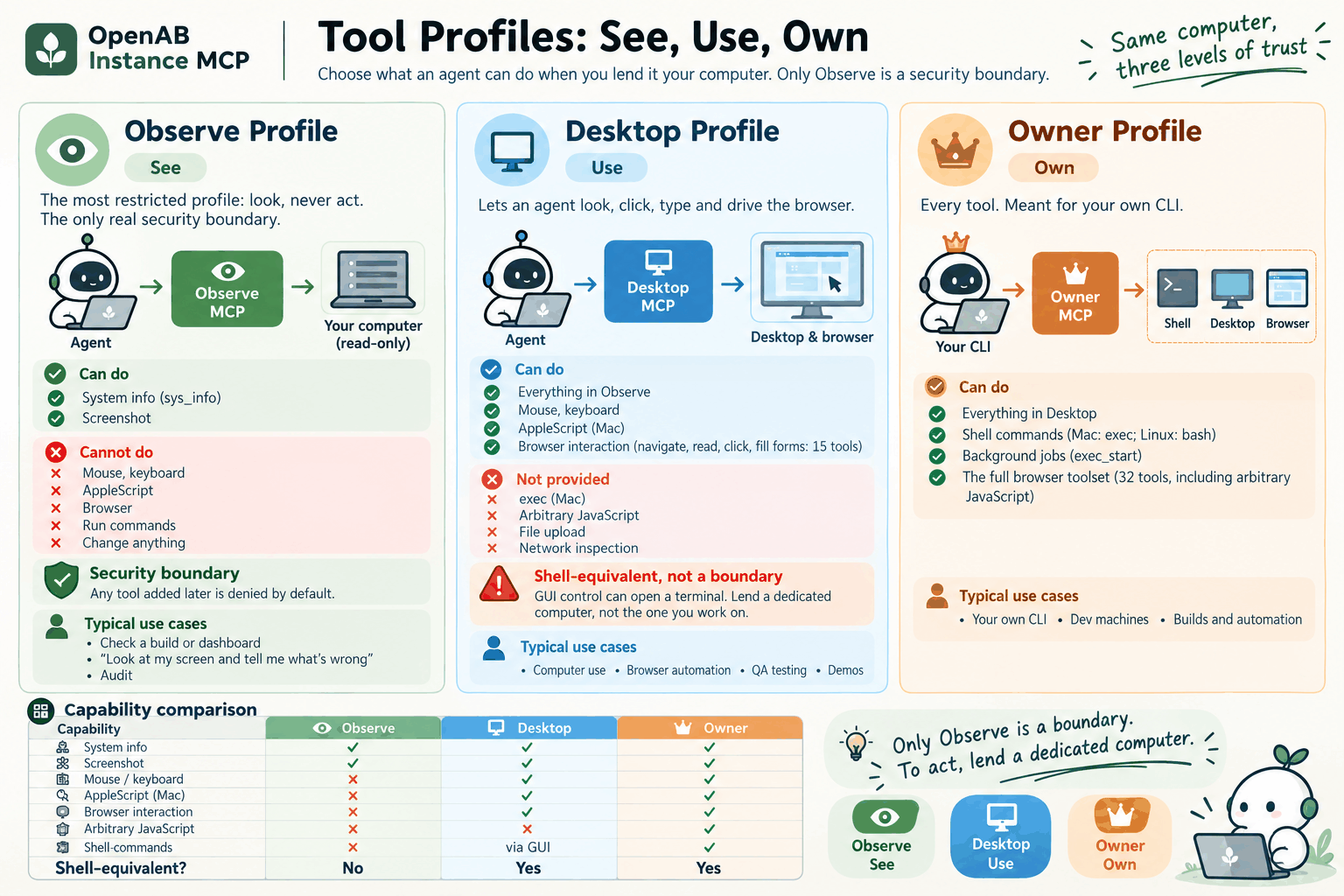
| Profile | Shell-equivalent? | Tools (macOS / Linux) | What you hand over |
|---|---|---|---|
observe | No | 2 / 2 | Your screen and system information, nothing more |
desktop | Yes (through the GUI) | 20 / 20 | Your desktop, which means your shell |
owner | Yes (directly) | 42 / 37 | Everything; meant for your own CLI |
On macOS desktop has no exec but keeps the mouse, keyboard and
AppleScript. On Linux it keeps bash outright: mouse and key can
open a terminal anyway, so hiding bash would only inconvenience the agent without taking
away a privilege, and we do not pretend otherwise. The full tool lists are in
tool-profiles.md.
Why only “look” is a boundary
observe has two tools, sys_info and screenshot. It cannot type,
click, run commands or change any state. Three things make it a boundary:
- It is an allowlist, not a denylist. Any tool added later, local or browser, is
denied under
observeuntil someone adds it on purpose. - Names describe capability.
observemeans look;desktopmeans drive the desktop. No more naming a profile after what was taken away. - The rule lives in a test, not in a document someone has to remember.
ProfileBoundaryTestschecks every profile: if one claims to be narrower than a shell while allowing any shell-capable tool, CI fails.
Its limit, stated plainly: a screenshot still shows whatever is on screen. observe
guarantees the agent cannot act, not that it cannot see. Close anything you would rather it did not
see before you lend.
One more thing: observe protects your computer, not the agent. Every screenshot
goes into the agent's context, so a hostile page or message on screen can act as a prompt injection.
The agent still cannot touch your computer, but it keeps its own shell in the pod, outbound internet
access by default, and whatever credentials the session holds (for example git) — it can send whatever
it reads to any host.
The browser is a separate question
owner sees all 32 browser tools; desktop sees 15: navigate, read, click, fill
in forms. The ones left out include arbitrary JavaScript (browser_evaluate,
browser_run_code_unsafe), file upload and PDF, network inspection, and raw
coordinate-based mouse events.
But this narrows the tools, not the browser. That browser uses this computer's persistent profile, with the cookies of every site you are signed in to, and it reaches whatever network the computer reaches, localhost and the tailnet included.
So which one should I pick?
- Default to look only. Most “can you take a look” requests need nothing more than
observe. The next Connect release makes it the default choice (not yet on the store). - To let it act, lend a dedicated computer. A Linux hands node, a throwaway machine
or a VM, not the one you work on. Choosing
desktophands over that computer's desktop user's shell for the whole lease. - Keep
ownerfor yourself. It is for your own CLI talking to your own computer.
Before you upgrade
This is a breaking change. From instance-mcp v0.7.0:
sandboxis refused (HTTP 400); it is not quietly mapped to anything.- Upgrade Connect and the lent computer together. An older Connect sending
sandboxis refused by an updated computer, and an updated Connect sendingdesktoporobserveis refused by an older one. If your Connect is still the older version, hold the computer back from v0.7.0. - A
sandboxgrant stored by an older build is dropped when the new one loads it; lend again.
One principle is behind all three: an unknown profile ends the grant. It never widens to
owner.
Separately, since v0.6.7 a lent computer reconnects on its own after its daemon restarts (macOS and Linux), so a deploy or a crash no longer means lending again.
Next (in development)
- A
browsertier: browser tools only, with a throwaway browser profile per grant, so the browser itself is the boundary. - Typed app control instead of generic
osascript: a bundle-ID allowlist that excludes Terminal, Script Editor and System Settings. - Custom policies: an allow/deny list supplied with the grant, held to the same shell-equivalence check.
- Lending a disposable macOS VM instead of the host itself.
A name is part of the interface
Our last note said the first question would be what an agent can touch. When an agent asks to
borrow your computer, the answer is written in the name of the profile you pick. So the name has to
tell the truth. sandbox promised something it could not deliver; we replaced it with
desktop, and gave you one more option that really can only look.