OpenAB Connect + Remote
Mac and iPhone · voice in Chinese, Cantonese, English, Japanese and Korean

Encrypted and distributed across your own private infrastructure.
Quit the app and they keep running.
Download on the Mac App StoreFree · macOS 13 or later
What struck me most is how it thinks, not the feature list. Most AI agent tools ship “it can act” first and bolt safety on later; this project does the reverse and settles the trust boundary first: the brain lives in a disposable sandbox, the hands are leased, revocable grants, the connection is always dialled out by the controlled side, and no port is ever opened. These decisions agree with each other and are written into a public contract and ADRs — the author clearly understands systems security rather than using “secure” as a marketing word. The docs are also honest about their own limits, which is rare in an early project.
Squarely on the pain point, and the architecture is genuinely forward-looking (agentic security).
Of everything I have seen that lets a coding agent touch a real desktop, this is the closest to the correct isolation model.
Quotes translated from the original Chinese.
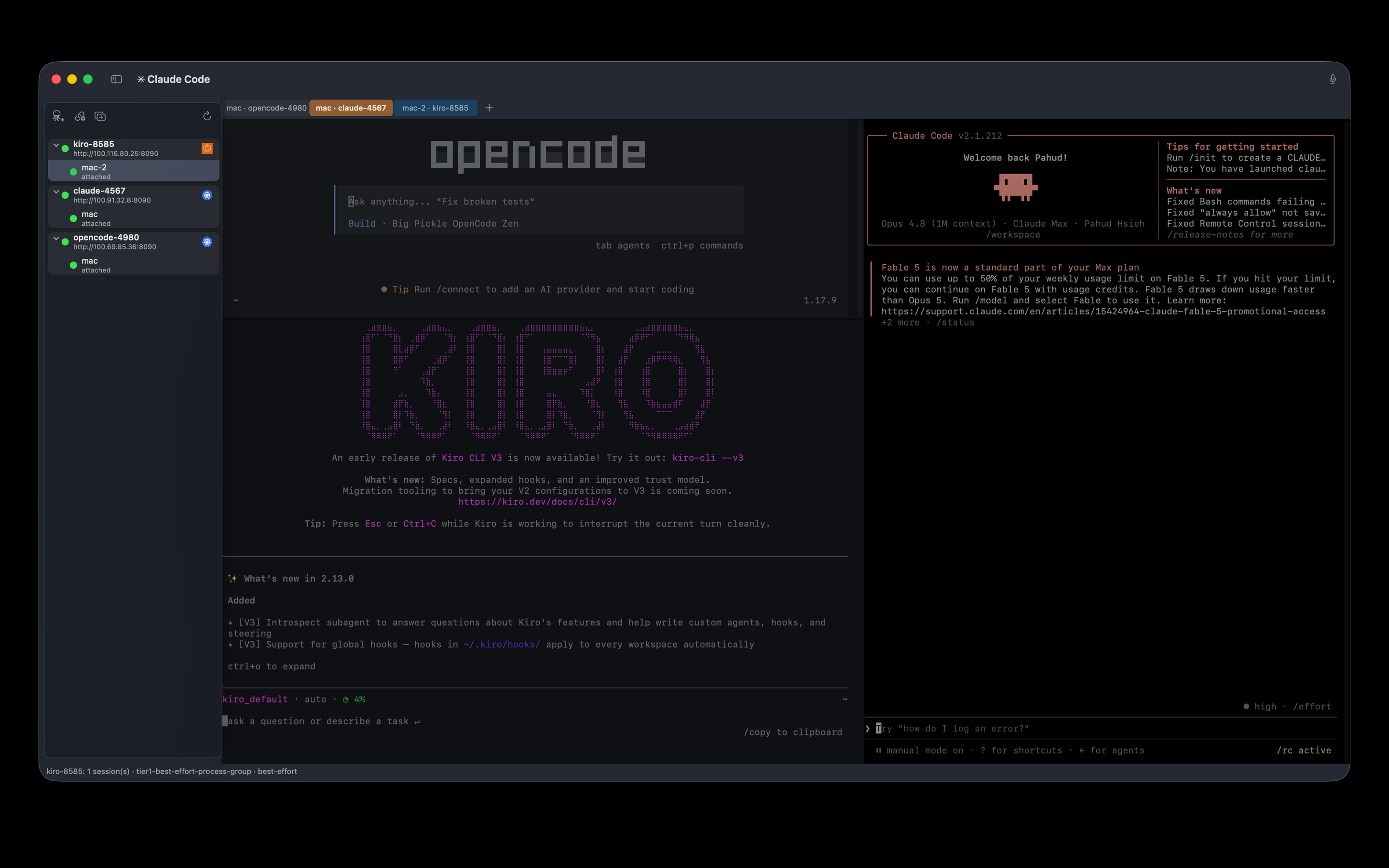
Thirteen agent CLIs, one image each — Claude Code, Codex, Cursor, Kiro, Gemini, Copilot and more. Chosen per session. The native variant carries no agent at all.
The shell runs in the container, not on your Mac. Quit the app and it keeps going; reopen and you are in the same split layout, output resuming from the byte where it stopped.
No ports opened, no ingress, no public endpoint. A Tailscale sidecar is the only thing with a network identity; the runtime binds loopback only.
It deploys a plain pod, so any conformant cluster works — k3s on a spare box, EKS, GKE. Or AWS ECS Fargate, where there is no cluster to run at all.
MIT licensed at openabdev/openab-pty. Read exactly what you are about to run, or write your own client against the published contract.
Talk to the agent instead of typing at it — the same session, driven by chat or voice through openab.

Your iPhone becomes a private push-to-talk remote. Speech is transcribed on-device, and only terminal-safe text is sent to the selected Mac session.
Download on the App StoreOpenAB landscape
A remote sandbox, your own Mac, and the clients in your hand form one private loop — connected by Tailscale, not a SaaS control plane.
Mac and iPhone · voice in Chinese, Cantonese, English, Japanese and Korean
Coding CLI in an isolated remote sandbox
Xcode, Simulator, browser and GUI tools on your Mac
Yes — because the app exposes its pane navigation and dictation as ordinary keyboard shortcuts (⌘[ / ⌘] to move between split panes, ⌃⌘M for dictation), anything that can synthesize keystrokes can drive it from across the room. Two step-by-step guides:
The D-pad or ring switches panes (an on-screen HUD shows which one), one button sends, and another starts on-device dictation through your Mac's mic — AirPods included.
Yes, with one setup step. GKE's default kubeconfig authenticates by running gke-gcloud-auth-plugin — an external credential helper — every time it needs a token. OpenAB Connect ships on the Mac App Store, and the App Sandbox does not allow a sandboxed app to execute an external helper like that, so a kubeconfig that relies on it cannot deploy.
The workaround is a static kubeconfig: one that carries a token or client certificate directly instead of an exec block. Generate it on your own machine (where gcloud runs unrestricted) and point the app at that file. A kubeconfig backed by a Google service account key is the durable form; a short-lived token works too but expires. EKS avoids this because the app talks to AWS through its own SDK rather than an external plugin — native GCP credentials are on the roadmap to close the same gap for GKE.
kubectl exec or SSH?Both give you a shell; neither gives you a session that survives. Quit your terminal mid-exec and the process dies with the connection. Here the session lives in the container, so closing the app closes a WebSocket and nothing else — the next launch re-attaches from the byte where output stopped and restores the same split layout. The deployment model differs too: no kubeconfig on the client, no port-forward, and a credential that authorises one session rather than your whole cluster.
Herdr is an agent multiplexer — tmux for coding agents. It gives each agent a real PTY, keeps them alive across disconnects, classifies every pane as working, blocked or idle, and exposes a CLI and a socket API. The persistence and the fleet view overlap with this app almost exactly. What differs is where the agents run:
uid 1000, no sudo, no host credentials, read-only root, ephemeral workspace — reached over a WireGuard tailnet with no port exposed. The blast radius is that container, not your machine, and it keeps running whether your laptop is closed, asleep, or a different laptop.The difference is sandboxing, not multiplexing. Herdr also does things OpenAB Connect does not: pane state classification, a scriptable local API, and running with no infrastructure at all. If you want nothing to deploy, Herdr is the better answer.
An agent on your Mac runs as you. It can reach your SSH keys, your cloud credentials, your npm and GitHub tokens, and every repository on the disk — so a wrong command is a wrong command on your machine. Here the shell has none of that, the workspace is discarded with the session, and several agents can work at once without competing for the same working tree or the same ports. Your laptop can sleep or close without stopping anything. The cost is real: the agent cannot see your local files, so work arrives by git; the first pull of an image takes a few minutes; and you need a cluster or an AWS account. For a quick edit in a repo you already have open, running locally is simpler and this adds nothing.
They are complementary by design. The split is what you care about:
The complement is structural, not an analogy: the PTY images are FROM ghcr.io/openabdev/openab, so the shell opens inside the same image the agent runs in, with the same CLI and the same workspace. When an agent leaves something half-finished you attach and look at it in situ. Neither requires the other, and the session models share nothing on purpose — a byte stream's liveness is defined by bytes and sockets, not turns.
The full account is in openab-pty's design document. OpenAB Connect is the first client implementation of the openab-pty client contract — the contract is published, so anything that can hold a credential and speak WebSocket can be the next one.
Deliberately little. It opens as uid 1000 with no sudo, no service-account token and no host credentials, on a read-only root filesystem with an ephemeral workspace. A session shell can reach the runtime over loopback, which is why the admin credential is never inside the container: an attach token authorises exactly one session and expires.
No. The runtime binds 127.0.0.1 and holds no TLS key. A Tailscale sidecar in the same pod is the only thing with a network identity, and the two talk over loopback inside the pod's network namespace. Traffic reaches you over the WireGuard tailnet, which is what carries the encryption.
Nothing. There is no service here — every server the app talks to is one you deployed, in your own cluster or your own AWS account. No account, no sign-up, no analytics, no telemetry. Credentials you supply stay in the macOS Keychain and go nowhere except your own runtime.
Yes. The runtime is MIT licensed at openabdev/openab-pty, and the client contract is published, so you can write your own client instead of using this one. This app is one implementation of that contract and is not open source.
Yes. Demo Mode in the app menu runs two sample connections and a recorded terminal with no network connection of any kind. It exists so the app can be evaluated before you deploy anything.
Three clicks, then eight steps: a credential is minted into your Keychain, the namespace is ensured, the secret and volume are created, the pod is applied, and the app waits for it to run, waits for it to join your tailnet, and verifies the admin plane. No manifests to write. The first deploy of an image can take a couple of minutes because the cluster is pulling it.
The workspace is discarded. That part is certain: it exists only for that session, and deleting the session deletes it.
What is not certain is processes. Deleting a session terminates that session's process group, but a process that deliberately leaves that group — a background job started with nohup or setsid — can outlive it until the pod or task is replaced. It is still confined to the same sandbox and gains no new reach, but it keeps consuming that pod's CPU and memory.
So this is labelled best-effort in the app rather than claimed as a clean kill. To be certain nothing remains, delete the pod or task.
Not yet — this is being built. Today each session is independent: you instruct each agent, and they do not delegate work to one another.
The design is public. It follows OpenAB's Agent Control Plane ADR — a hub-and-spoke registration and routing service that lets agents delegate directly over ACP on WebSocket instead of round-tripping through a chat platform, which costs rate limits, latency, and orchestration noise in channels meant for people. Three parts: a registry of who is alive and how they are labelled, a router that dispatches by name, label or namespace, and policy covering delegation depth, cycles, namespaces and allowlists.
One decision there matches this app's model: agents dial out to the control plane, so working across networks needs no inbound port at either end.
The ADR is merged; the implementation is not shipped. Contributions welcome — that document is where the discussion starts.
The quotes under the hero come from three conversations in which the runtime's public contract and ADRs were handed to a model and it was asked for an assessment. They are quoted verbatim (translated from Chinese on this page); each conversation is shared in full so the context can be checked.
A model reading the design documents is not a security audit, and these are not endorsements. They are shown because the reasoning they responded to is the same reasoning this page makes.